
VWAP weights the typical price of every candle in a period by that candle's volume. The formula is cumulative (typical price × volume) ÷ cumulative volume. The heavier a candle's volume, the more its price level counts in the result, so the line leans toward those candles. Both the numerator and the denominator start adding from the period's first candle. When the period ends, the two running totals are thrown away and the first candle of the next period starts again from zero, which is why the line on the chart is drawn as separate segments, one per period.
On TradingView, the length of that period is set by Anchor Period in the settings: one trading session, a week, a month or longer. It has to be longer than the chart timeframe. Anchor to the session while the chart is on the daily timeframe, and the indicator resets on every candle.
1. The five steps of the VWAP calculation, worked through three candles
The steps here follow the Calculation section of the VWAP (Volume Weighted Average Price) page in TradingView's Help Center. VWAP measures the average price weighted by volume, and it takes five steps.
- Work out the candle's Typical Price:
(High + Low + Close) ÷ 3 - Multiply the typical price by the candle's volume
- Keep a running total of the products from step 2
- Keep a running total of volume
- Divide one running total by the other:
VWAP = Cumulative(Typical Price × Volume) ÷ Cumulative(Volume)
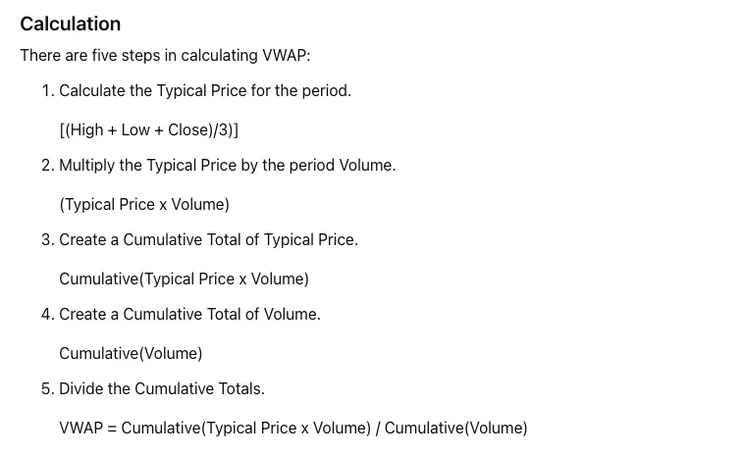
The first two steps are the same as the first two in MFI: typical price times volume. The two part ways after that, because VWAP goes on to accumulate the products. If you want an indicator that looks at volume on its own, that's OBV.
Here are the first three 5-minute candles of one period, with volume of 200, 500 and 300:
| Candle | High | Low | Close | Volume | Typical price | Typical price × volume | Cumulative product | Cumulative volume | VWAP |
|---|---|---|---|---|---|---|---|---|---|
| 1 | 101 | 99 | 100 | 200 | 100 | 20,000 | 20,000 | 200 | 100.00 |
| 2 | 104 | 100 | 102 | 500 | 102 | 51,000 | 71,000 | 700 | 101.43 |
| 3 | 103 | 98 | 99 | 300 | 100 | 30,000 | 101,000 | 1,000 | 101.00 |
- Candle 1: (101 + 99 + 100) ÷ 3 = 100; times 200 is 20,000. VWAP = 20,000 ÷ 200 = 100.
- Candle 2: (104 + 100 + 102) ÷ 3 = 102; times 500 is 51,000. Cumulative product 20,000 + 51,000 = 71,000, cumulative volume 700, VWAP = 71,000 ÷ 700 ≈ 101.43.
- Candle 3: (103 + 98 + 99) ÷ 3 = 100; times 300 is 30,000. Cumulative product 101,000, cumulative volume 1,000, VWAP = 101,000 ÷ 1,000 = 101.
The three typical prices are 100, 102 and 100, and their plain average is 302 ÷ 3 ≈ 100.67. VWAP comes out at 101, higher than that, because the candle with the most volume, candle 2 at 500, also has the highest typical price and carries half the weight.
Candle 1's VWAP equals its own typical price: at that point the volume in the numerator and the volume in the denominator are the same number, and they cancel.
2. Why does VWAP reset at the start of the next period?
Because VWAP measures the average traded price of a single period. In StockCharts' ChartSchool article on Volume-Weighted Average Price (VWAP), VWAP equals the dollar value of all trading periods divided by the total trading volume for the current day; the calculation uses intraday data from a single market day, starts when trading opens, ends when it closes, and starts fresh at every open. TradingView puts it the same way in its Summary: the indicator begins calculating at the open and stops calculating at the close.
Resetting or not makes a large difference to the number. Carrying on from the three candles above, say the first candle of the next period has a high of 97, a low of 95, a close of 96 and volume of 100, which makes its typical price 96.
- With a reset: cumulative product 96 × 100 = 9,600, cumulative volume 100, VWAP = 96.
- Without a reset: cumulative product 101,000 + 9,600 = 110,600, cumulative volume 1,100, VWAP = 110,600 ÷ 1,100 ≈ 100.55.
Price is already trading around 96, yet the line that wasn't reset is still sitting at 100.55, and 1,000 of its 1,100 in cumulative volume comes from the previous period.
The open and the close are the boundaries both pages use for the period, which makes it one trading session. On an instrument that trades around the clock, which candle starts the session is decided by the charting platform. Before you rely on the line, check two things on the platform you use. One is what the platform says about that instrument's trading session. The other is a test: switch the chart to a minute timeframe and look at the candle you believe is the first of the session. Its VWAP should equal its own typical price.
3. Anchor Period must be longer than the chart timeframe: Session on a daily chart resets every candle
The Anchor Period input on TradingView's built-in VWAP offers Session, Week, Month, Quarter, Year, Decade and Century, plus three that reset on events: Earnings, Dividends and Splits. With Week selected, the totals start accumulating from the first trading day of each week.
There is one requirement when choosing among them: each period needs several candles inside it for the indicator to work properly. In practice that means an anchor period several times longer than the chart timeframe. In a 390-minute stock trading day, a 5-minute chart with Session gives 390 ÷ 5 = 78 candles. For a different instrument or chart timeframe, divide the session length by the chart timeframe and you have the number of candles in one period.
A daily chart with Session works out to one candle, and that is the very combination the input's description uses as its example: it is not useful, because the indicator will be reset on every bar. Run the formula on a single candle and you can see how little such a reset leaves on the line: cumulative product divided by cumulative volume, the volume cancels, and you are left with that candle's typical price. Treat the three candles from section 1 as three daily candles and the line's three points are 100, 102 and 100, whether the volume is 200 or 20,000. No weighting takes place in this setup.
To see a volume-weighted average line on a daily chart, change Anchor Period to an option much longer than a day, such as Month or Quarter. If you want the current day's VWAP, switch the chart back to a minute or hourly timeframe.
StockCharts' rules are narrower. Its VWAP is calculated over a single trading day only, the chart periods on offer are 1, 5, 10, 15, 30 and 60 minutes, and it notes that VWAP is not defined for daily, weekly or monthly periods because of the nature of the calculation. That is a different thing from the anchor options above. TradingView's page says VWAP can be used over any time frame, and besides intraday seconds, minutes and hours it lists week, month, year, decade and century. Read the line by the rules of whichever charting service you are using.
4. How do you read price above, below, or crossing back and forth over VWAP?
| Price relative to VWAP | TradingView help page | StockCharts article |
|---|---|---|
| Trading above | Characteristic of a bullish trend | Relatively high for that day or that specific time; intraday prices generally rise when above VWAP |
| Trading below | Characteristic of a bearish trend | Relatively low for that day or that specific time; intraday prices generally fall when below VWAP |
| Trading both above and below | Characteristic of a sideways market | — |
The same reading comes up elsewhere on the TradingView page: as with a moving average, prices are above the indicator line when they are advancing and below it when they are declining, and the trend is up when price is above VWAP and down when it is below. The table's wording is hedged ("characteristic", "generally"), and every entry describes where price sits relative to the period's average traded price.
In section 1, candle 3 closed at 99 with VWAP at 101, so the close was 2 points below the line; candle 2 closed at 102 with VWAP at about 101.43, so the close was above the line.
The StockCharts article also explains where the line came from: it was originally developed by institutional investors to place large orders without disrupting the market, and retail investors can use it too. VWAP is a price level weighted by volume and can be used to identify liquidity points, which helps institutions with large orders.
5. VWAP lags more as the close approaches, and the bands only show dispersion
VWAP is an average calculated from past data, so lag is built in. TradingView's page describes how that plays out over a day: on a short-timeframe chart such as 1 minute there can be several hundred candles in a single day, the closer it gets to the day's close the more the indicator lags, and the same is true of any indicator that averages past data. The StockCharts article puts numbers on it: on a one-minute chart, IBM has 90 data points by 11:00 AM, 210 by 1:00 PM and 390 by the close; the more data, the greater the lag, and the lag increases as the day goes on.
Put the same candle at different points in the period and you can watch the lag grow. This candle has a typical price of 110 and volume of 100, a product of 11,000.
- After candle 1: (20,000 + 11,000) ÷ (200 + 100) ≈ 103.33, lifting VWAP by 3.33 from 100.
- After candle 3: (101,000 + 11,000) ÷ (1,000 + 100) ≈ 101.82, lifting VWAP by 0.82 from 101.
Same price, same volume, but once cumulative volume has gone from 200 to 1,000, the push on the line is only about a quarter as large. The later in the period, the larger the denominator and the harder it is for new trades to move the line; when price runs away quickly late in the period, VWAP is slow to follow.
Bands can be drawn on either side of the VWAP line, up to three sets, each with its own multiplier (Bands Multiplier #1 to #3 in the settings). When a set is ticked, the indicator calculates the standard deviation of all VWAP values since the last anchor, multiplies it by that set's multiplier and plots the result on the chart. A separate setting, Bands Calculation mode, controls the units used for the distance from the bands to VWAP; with Percentage selected, a multiplier of 1 means 1%. What gets drawn is a range on either side of VWAP. Bollinger Bands draw their upper and lower bands the same way, from a standard deviation times a multiplier.
6. Two VWAP settings worth checking: Source and Hide VWAP on 1D or Above
Can the VWAP source be changed from hlc3 to hl2?
Yes. The Source input on TradingView defaults to hlc3, the average of the high, low and close; hl2, which the help page mentions as another common option, averages only the high and the low. Changing it changes the typical price in step one: candle 3 in section 1 is 100 under hlc3 and 100.5 under hl2, and across the three candles VWAP goes from 101 to 101.15.
Which setting stops VWAP from showing on a daily chart?
TradingView's VWAP settings include a Hide VWAP on 1D or Above switch. The help page's description is that, when it is selected, VWAP is displayed only on intraday timeframes. If the line is missing on a daily or weekly chart, open the indicator settings and see whether this box is ticked; before you untick it, also change Anchor Period to one that is longer than the chart timeframe.